 Aximo
Aximo en
en Русский
Working modes
Private feed, channel, group or forum topic — and how to switch between them.
AximoBot keeps a separate list of sources and a separate set of settings for every chat it delivers to. Your account can control any number of chats; the plan limit on sources is counted across all of them.
Private mode
The default. Posts arrive in your dialogue with the bot. This is the mode for a personal feed: the accounts you follow, translated if you like, without ads and without opening five apps.
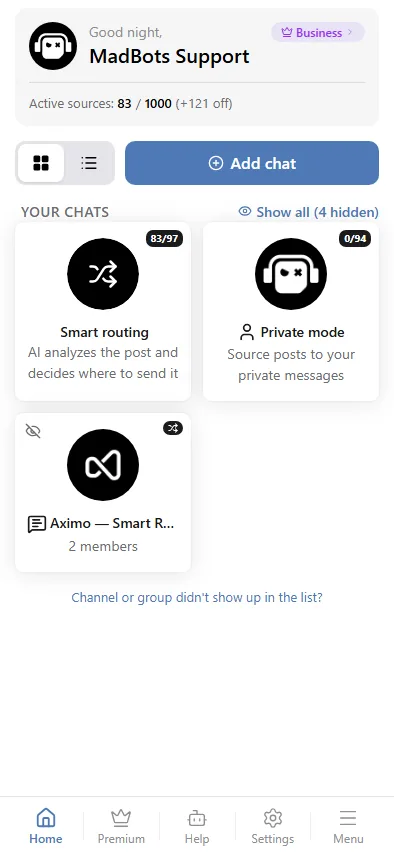
In the mini app the private chat is the card called Private mode on the home screen.
Channel and group mode
The bot can post into any channel or group where you are an administrator. You do not add it by hand: the mini app does it through Telegram.
- On the home screen of the mini app press Add chat. If both channels and groups are allowed, the app first asks Where to add the bot? — Channel or Group; Telegram lists them separately.
- Telegram opens its own picker with your channels or groups of that type. Pick one, and Telegram adds @AximoBot to it as an administrator with the rights it needs — to post, edit and delete messages — in one step.
- The bot is told about the new rights and connects the chat on its own. It appears on the home screen with its own card; tap it to add sources and change settings. The chat's admins are synced into Team at this point.
In the browser version (the web login) Telegram's picker is not available, so Add chat shows instructions instead: open Telegram, add @AximoBot to the channel or group and grant it admin rights — the chat then shows up in the list by itself. The same happens whenever the bot is made an administrator by hand: Telegram tells it about the change, nothing else is needed.
When you search for the bot, make sure the username is exactly @AximoBot. Bots with similar names are not ours.
Only administrators of a chat can connect it. The rights to edit and delete are needed for moderation and for the bot's own copyright line; in a channel a plain member is rejected.
Forum topics
In a group with topics enabled you can direct posts into a specific topic.
- The whole chat: open the chat in the mini app, scroll to Forum Topic ID and enter the topic number. Every source of that chat will post there.
- One source: the same field exists in the source settings and overrides the chat value.
The topic number is the last part of a message link inside the topic, for example https://t.me/mygroup/55 — the topic is 55.
The field needs a paid plan, at both chat and source level; on the free plan it is read-only.
Unlinking a chat
A chat is detached from your account with Unlink chat at the bottom of its settings in the mini app. A detached chat still shows on the home screen. Tap it and the app asks Restore the chat? — the bot never left, so confirming just relinks it, with nothing to re-add.
Delivery under your own bot
In channels and groups the messages can come from a bot you created in BotFather instead of @AximoBot. That is a paid feature, see On behalf of your bot.