 Aximo
Aximo en
en Русский
Auto-delete
Remove delivered posts from the chat after a set time, or keep only the last N, with text rules.
Channels with deals, discounts, signals and short-lived news go stale fast: a two-day-old post only clutters the feed. Auto-delete messages removes what the bot delivered to the chat on its own: after a set time, or so that only the latest posts stay.
Available from the Expert plan. Turning auto-delete off is allowed on any plan.
The item is in Chat settings, under the Settings category — last, after "Live streams & premieres" — and in the settings menu of every source.
The screen
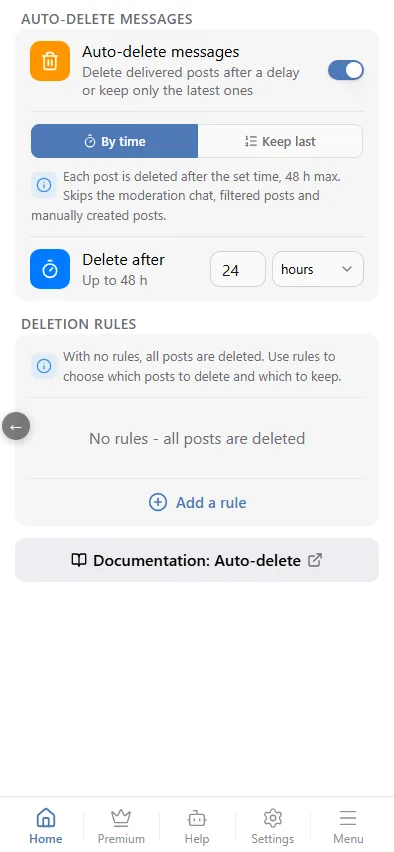
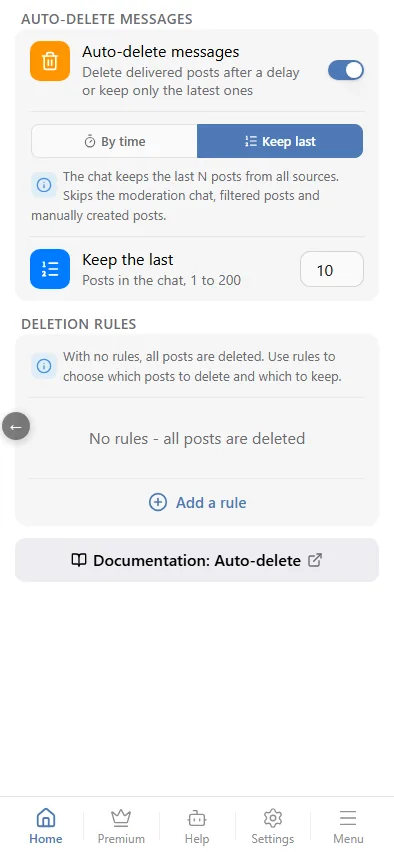
While auto-delete is off, the screen shows a short explanation and the Auto-delete messages switch. Once on, a mode switch appears with a hint under it, including what auto-delete never touches.
- By time — each post is deleted a set time after delivery. The Delete after row: a number and a unit (minutes or hours), up to 48 hours. Example: a deals channel where an offer lives for two hours — 2 hours.
- Keep last — only the latest posts stay in the chat. The Keep the last row: a number from 1 to 200; older posts are deleted as new ones arrive. Example: a signals channel where you only want the freshest ten. At chat level the posts of all sources are counted, at source level only that source's posts.
Turning the switch off also cancels deletions that are already scheduled.
Deletion rules
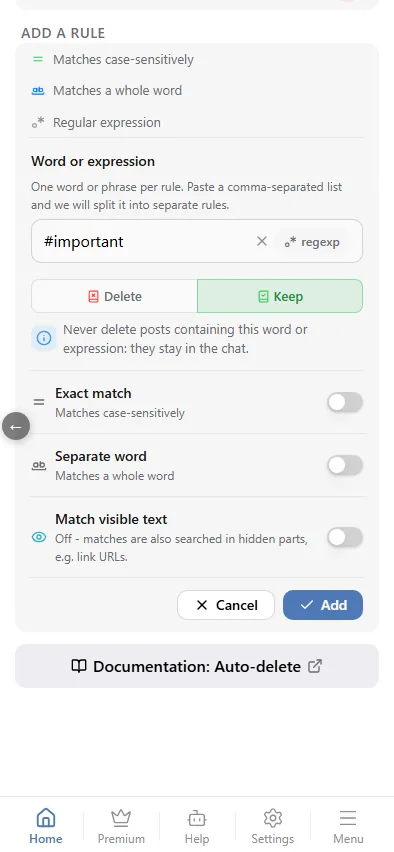
The Deletion rules block sits below the mode settings. While there are no rules, a note explains: with no rules, all posts are deleted, and rules let you choose which posts to delete and which to keep. A Delete rule deletes only matching posts; a Keep rule always keeps matching posts. The add form opens only with the Add a rule button (focus jumps to the field).
It is the same editor as the filter rules:
- a field with the regexp toggle inside it (the pattern is shown as /…/i), a regex cheat sheet ("?") and a tester;
- a choice of Delete / Keep;
- switches Exact match (case-sensitive), Separate word and Match visible text — when off, hidden parts such as link URLs are searched too; not available for regular expressions;
- Cancel and Add buttons.
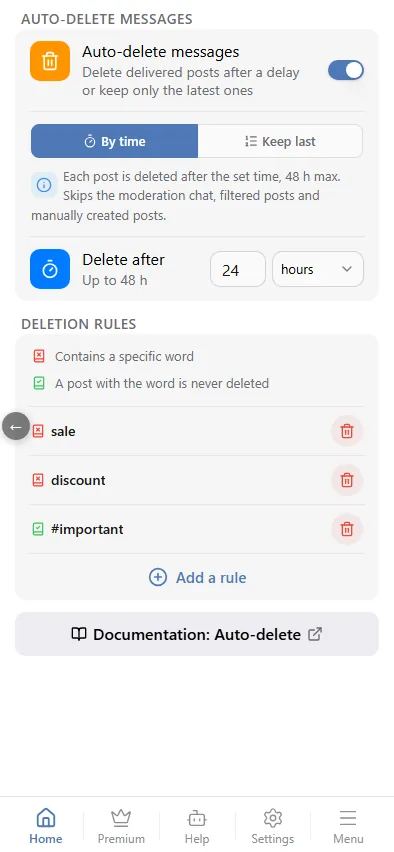
If you type a comma-separated list, the editor offers Split into N rules. Only one form is open at a time: starting to edit a rule closes the add form and the other way round — unsaved changes are dropped. Once rules exist, a one-line icon legend appears above the list, and rules are paged 10 per page.
Rules check the text of the delivered post. If the text cannot be read, a post is not deleted when rules are set. In Last mode with rules, N counts only the posts the rules mark.
Example. Mode "By time", 24 hours; two Delete rules with the words "sale" and "discount"; a Keep rule with "#important". Sales and discounts vanish after a day, posts with "#important" stay forever.
Chat and source
- The setting in Chat settings applies to every source of the chat.
- A source's own setting fully replaces the chat setting, rules included.
- An explicit off on a source disables the chat's auto-delete for that source.
- Reset to the chat's settings on a source removes its own setting, and the chat setting applies again.
Limits
- Telegram lets a bot delete messages only within 48 hours of sending, so "By time" is capped at 48 hours. In "Last" mode the bot cannot delete posts older than 48 hours — they stay in the chat.
- Auto-delete does not apply to the moderation chat, the filtered-posts chat, the test send or manually created posts (they have their own setting, see Own posts).
- If a post was already deleted by hand, the bot simply skips it.