 Aximo
Aximo en
en Русский
Text replacements
Strip links, hashtags, mentions and emoji, or replace any text with your own.
Text Replacements rewrites the post text before it is delivered. It exists for the chat and for every source, with the override/merge switch for sources.
Base replacements
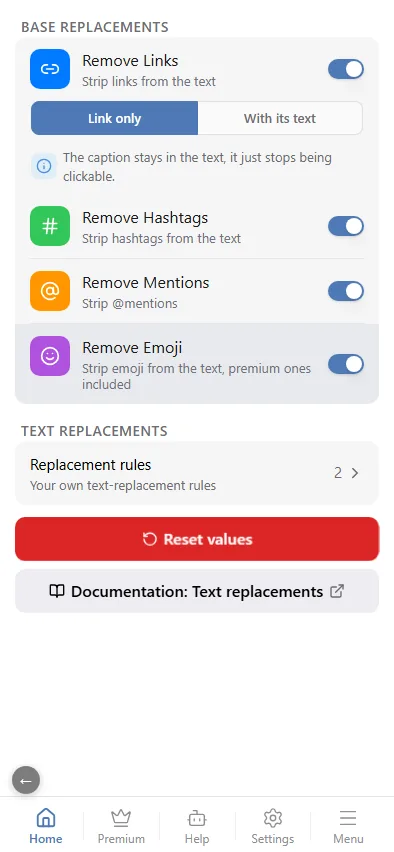
Four switches cover the common cleanups:
- Remove links — strip URLs from the text. Under the switch you choose what goes: Link only — the caption stays in the text, it just stops being clickable; With its text — both the link and its caption are removed.
- Remove hashtags — strip
#tags. - Remove mentions — strip
@mentions. - Remove emoji — strip emoji, premium ones included.
Remove title, Remove link to original, Remove post text and Title below the text live in Message template — they are about the post's shape, not a text replacement.
Replacement rules
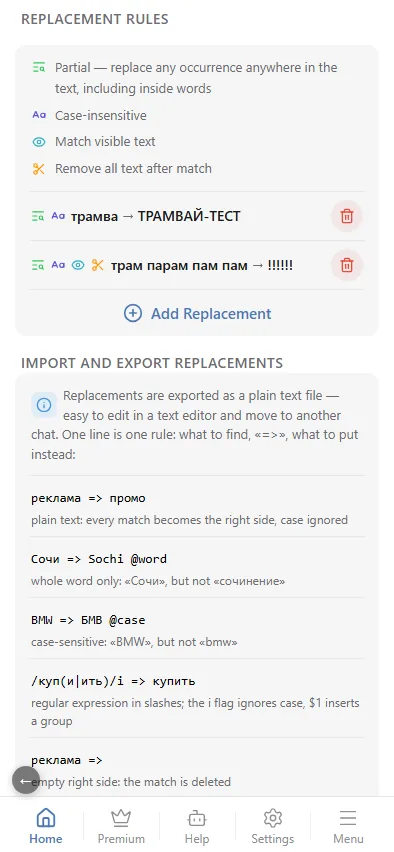
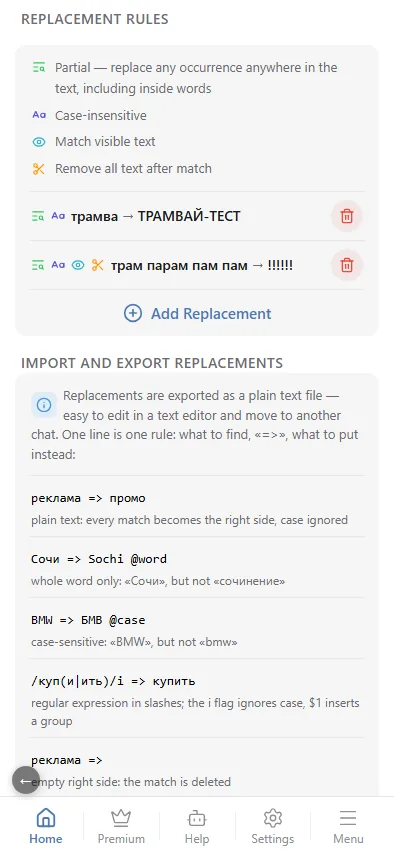
Replacement rules opens the list of your own rules. A rule has the text to find, the text to put instead (leave it empty to delete the match) and match options:
- Partial or Word — replace any occurrence anywhere in the text, including inside words, or only whole words.
- Case-insensitive —
BBC,bbcandBbcare treated the same. - Regular expression — the "find" field is a JavaScript pattern; capture groups can be used in the replacement as
$1,$2. The field shows the flags delivery actually applies —/pattern/gor/pattern/giwhen case-insensitive is on, plusuwhenever the pattern uses\p{…}— and there is nom, so^/$mean the start/end of the whole text. The ▶ button next to the field opens a test box: paste a sample post and every match is highlighted, with a count underneath. The ? button opens a cheat sheet of common patterns — tap one to insert it.\wand\bonly recognize Latin letters, so they miss Cyrillic text; use[а-яёA-Za-z0-9_]or\p{L}instead. - Remove all after — delete everything from the match to the end of the text. Handy for signatures and "Read more" tails. With a regular expression, turning this on appends a visible
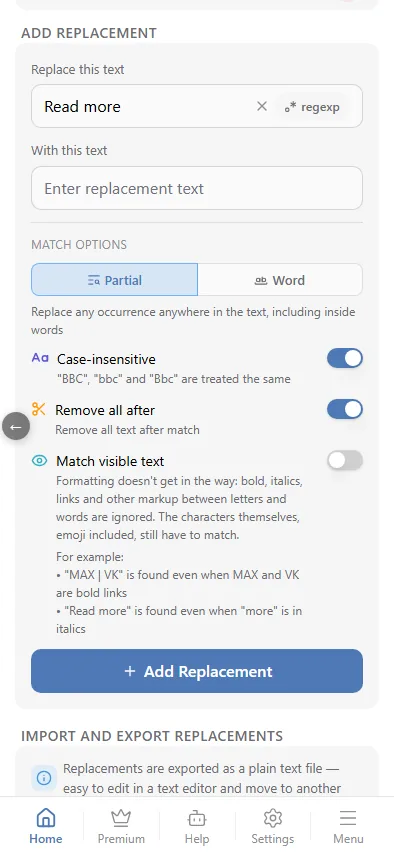
[\s\S]*to the pattern shown in the field — a reminder that the match now reaches to the end of the text. - Match visible text — match the text as it looks in the post: bold, italics, links and other markup between letters and words do not break the match. For example, "MAX | VK" is found even when MAX and VK are bold links. The characters themselves, emoji included, still have to match. The option does not apply to a regular expression.
The file-format words work in the form too: type @cut, @word, @case or @visible at the end of the "replace with" field (Read more => @cut becomes an empty replacement with Remove all after on) and, when the rule is saved, the word turns into its switch instead of going out to the chat as text.
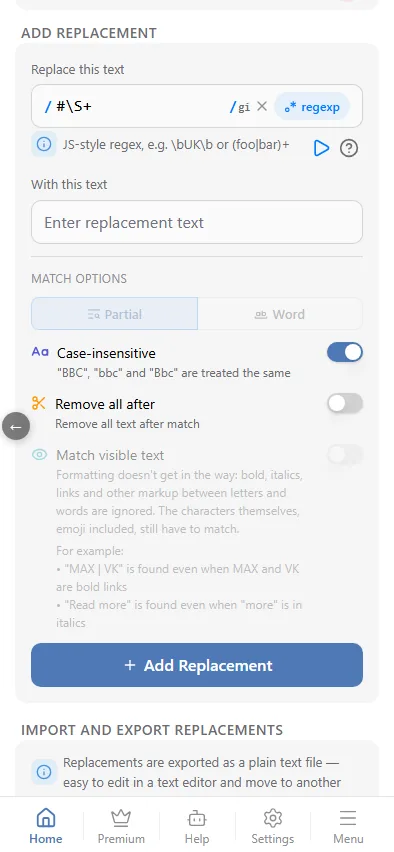
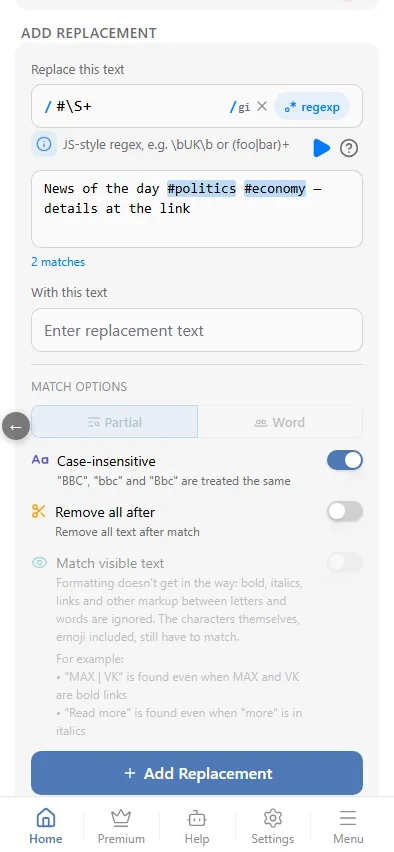
Adding a rule, step by step — on the example of a "Read more" tail: the text to find, an empty replacement and Remove all after switched on:
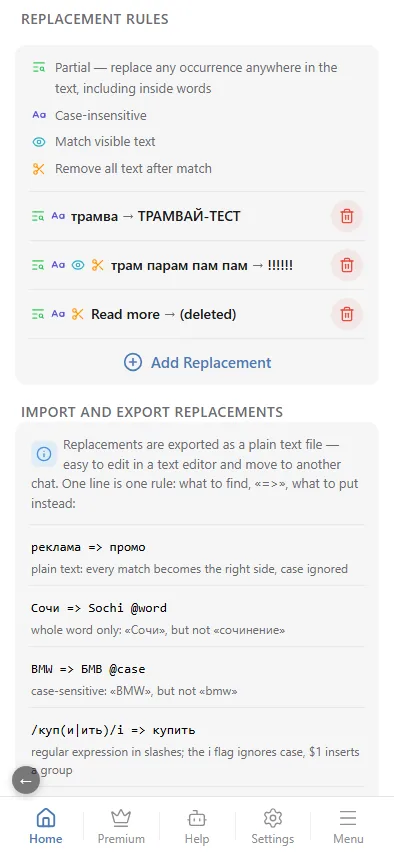
Rules run in the order of the list, on the text as it is after the base replacements.
How the replacements screen works:
- A legend at the top of the card explains the icons — only the ones your replacements actually use: partial match, whole word, regular expression, case-insensitive, match visible text, remove all after.
- 10 replacements per page — with more, page numbers appear under the list.
- Tap a replacement to change it: the same form opens with Cancel and Save.
- Add Replacement under the list opens the add form; while there are no replacements yet, the form is shown right away. Opening the form closes an edit in progress without saving, and the other way round.
Import and export of replacements
At the bottom of "Replacement rules" — Download replacements and Load from file. Replacements are exported as a plain text file: easy to edit in a text editor and move to another chat or source. One line — one rule: what to find, =>, what to put instead.
| Line | Meaning |
|---|---|
ads => promo | plain text: every match becomes the right side, case ignored |
Sochi => Сочи @word | whole word only: "Sochi", but not "Sochinenie" |
BMW => БМВ @case | case-sensitive: "BMW", but not "bmw" |
/bu(y|ying)/i => buy | regular expression in slashes; the i flag ignores case, $1 inserts a group |
ads => | empty right side: the match is deleted |
Read more => @cut | cut the text from the match to the end |
MAX | VK => @cut @visible | match visible text: markup inside the match — bold, italics, links — is ignored |
# note | comment, skipped on import |
Sample file shows such a template in full. A loaded file adds its rules to the existing ones; rules you already have are not duplicated.
Examples
| Find | Replace with | Options | Effect |
|---|---|---|---|
Subscribe to our channel | (empty) | Case-insensitive | removes the call to action |
Read the full story | (empty) | Remove all after | cuts the tail of every post |
(\d+) USD | $1 dollars | Regular expression | rewrites currency |
t.me/othersource | t.me/mychannel | Partial | swaps the promoted link |
Where replacements sit on a post's path
Replacements run on the post's original text — before translation and before AI processing, so the model gets already cleaned-up text. Filters also have a "Replaced" stage that runs on a copy of the text with the replacements already applied. The full order is in A post's path.