 Aximo
Aximo en
en Русский
Message content
Which media reach the chat — photos, video, audio, files, first item of an album — plus a default picture for posts whose media could not be downloaded.
HomeChatMessage Content
HomeChatList of SourcesSourceMessage Content
Message Content decides what part of a post reaches the chat and a few delivery details. It exists for the chat and for every source.
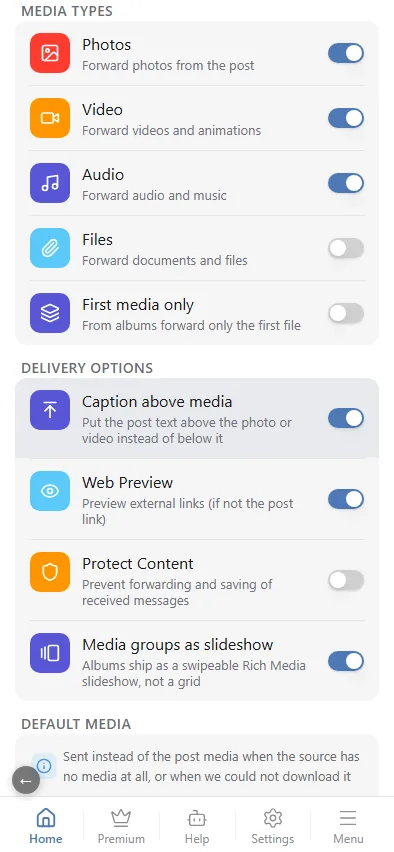
Media types
- Photos — forward photos from the post.
- Video — forward videos and animations.
- Audio — forward audio and music.
- Files — forward documents and files.
- First media only — from albums forward only the first file. Useful for channels that want one picture per post.
- Default media — a picture of your own, sent in place of the post's media when the source gave none, or when the media could not be downloaded. The post still arrives with its text and its link instead of looking empty.
A post whose only media is switched off is delivered as text; a post with no text and no allowed media is skipped and appears in the log as filtered.
Delivery options
- Caption above media — put the post text above the photo or video instead of below it.
- Web preview — show a link preview for external links in the text when the link differs from the post URL.
- Protect content — forbid forwarding and saving of the delivered messages (Telegram's protected content flag).
- Media groups as slideshow — for Rich delivery, albums ship as a swipeable slideshow instead of a grid; a forwarded original (direct connection Forward mode) always keeps the native album.
There is no spoiler toggle on this screen: it lives on the SOURCE level — the source card, the Display options block, the Spoiler mode toggle. In your own post a spoiler covers the whole post or a single file — the eye on a tile.