 Aximo
Aximo en
en Русский
The delivery log
Every post the bot handled — delivered, filtered or failed — with the reason, the delivered media and the full processing trace; filters by outcome, filter kind, source and dates.
The delivery log shows what happened to each post the bot took from your sources: it was delivered, a filter stopped it, or delivery failed. Messages from sources in the chat settings shows the log of all the chat's sources; Sent messages in a source card shows the same log for that one source.
A row of the log
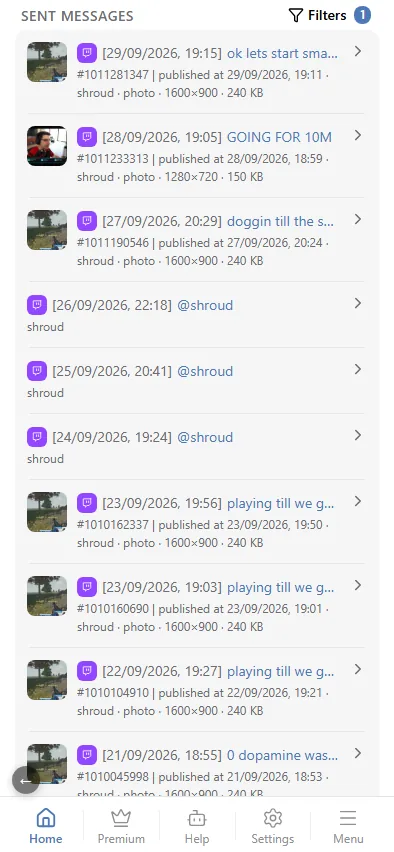
The first line is the post itself: the platform icon, the time it was delivered or filtered, and the post's title — or the source's name when the post has none — as a link to the original. A funnel icon in front means the post was filtered.
The second line says what happened and to which post:
- Delivered — the id of the message in your chat. For one file you also see its resolution, video length and size; for an album, its total size. So you can see at a glance which quality went out.
- Filtered — the reason in red: which stop word, rule or check stopped the post.
- Failed — the error in red: the bot was removed from the chat, has no right to post, Telegram rate-limited sending, and so on.
- After the "|" — when the source published the post, the source, what the post contained (photo ×4, video) and, for a delivery that was not an ordinary new post, what caused it: Force send, Edited, Scheduled, Digest, Moderation.
A post can be delivered without part of its media. Then the row gets a warning line: the video could not be downloaded, the video is over your plan's size limit, a photo was skipped because Telegram does not accept its proportions.
Opening a post
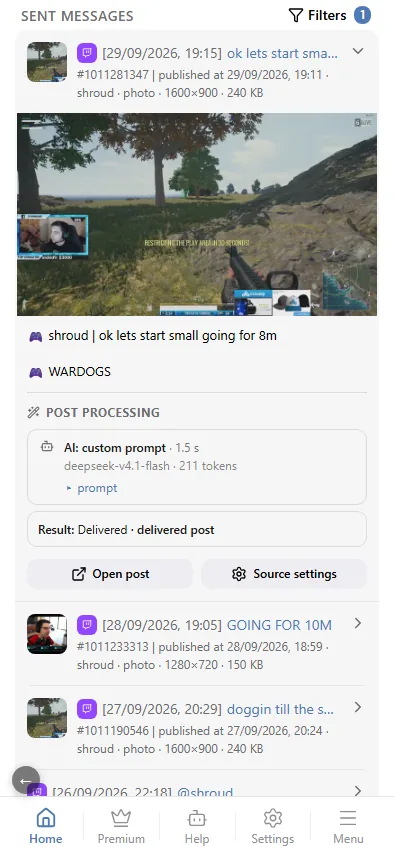
Tap a row to expand it:
- the delivered media — an album in full, with the size of each file, or a single image;
- the text as it was sent, and the buttons under the post, if any;
- Post processing — the post's path step by step: filters on the original text, replacements, translation, each AI prompt with the model, time and tokens spent, and the prompt text itself; at the bottom, the result — delivered, filtered and by what, or the error;
- Open post — the delivered message in your chat, as the reader sees it;
- Source settings — straight to the source card, to check or switch off the rule that fired.
The order of the steps is explained in A post's path.
Filters
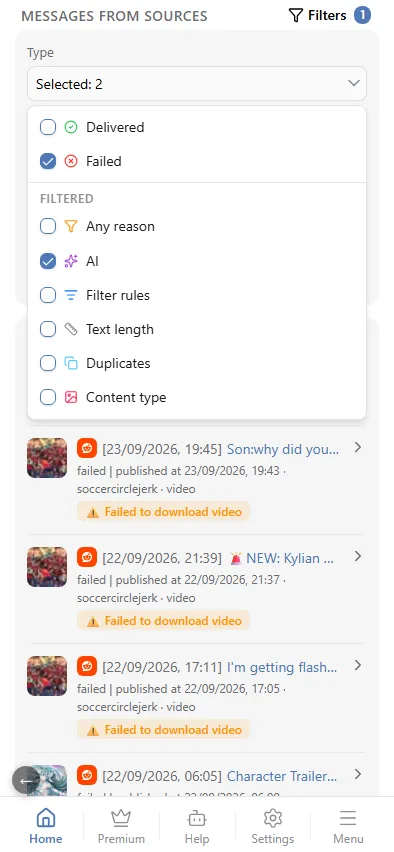
Filters above the log opens a panel; the number next to it shows how many filters are on. Apply applies the selection, Reset brings back the full log.
- Type — the outcome. Tick one or several at once; nothing ticked means all posts:
- Delivered;
- Failed — everything that did not reach the chat and was not filtered: delivery errors and posts skipped for another reason, such as a plan limit;
- under Filtered: Any reason — every post a filter stopped, and one kind at a time: AI (an AI prompt rejected the post), Filter rules (stop words, allowed words, blocklist — see Message filtering), Text length (the length rule, too short or too long a text), Duplicates (similar posts and repeats), Content type (no media, no photo, no video, no text, a repost, the wrong topic).
- Filter by source — one source, grouped by platform. In a source card it starts on that source; switch it to see the whole chat.
- Source type — only Telegram, only RSS, and so on.
- From / To — a date range; either end can be left empty.
A post an AI marker stopped at the "After AI" stage (see AI filters) is a stop word, so it is under Filter rules, with the marker as the reason.
The log and the events log
The delivery log is about posts. The events log is about the chat: settings changed, a source switched off because it stopped responding, an OpenRouter key that no longer works. It also counts the posts that did not reach the chat, but the reason for a specific post is in the delivery log.
Filtered posts can also be sent to a separate chat — see Chat for filtered messages.