 Aximo
Aximo en
en Русский
On behalf of your bot
Deliver posts to a channel or group under the name and avatar of a bot you created.
HomeChatDeliver Messages by Your Bot
By default messages in a channel or group come from @AximoBot. You can replace it with your own bot: readers see your bot's name and avatar, and nothing in the message points to AximoBot. It needs the Expert plan or higher.
Create the bot
- Open @BotFather in Telegram and send
/newbot. - Choose a name (what readers see) and a username (must end in
bot). - Copy the token BotFather returns. It looks like
1234567890:AAF….
Optionally set an avatar with /setuserpic and a description with /setdescription.
Connect it
- In the mini app open the channel or group, then Deliver Messages by Your Bot.
- Paste the token and press the plus button. The bot verifies the token and shows the bot's name.
- Add your bot to the channel or group as an administrator with the right to post messages. @AximoBot must stay an administrator too: it manages the chat, your bot only sends.
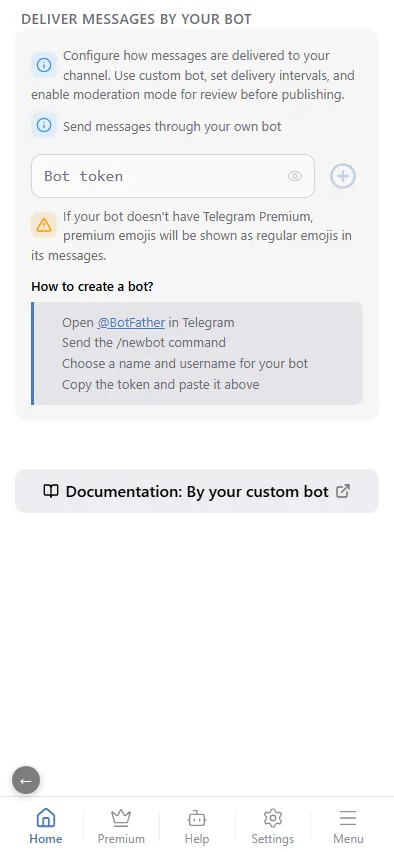
From that moment every post of this chat is sent by your bot. The setting is per chat; other chats keep @AximoBot unless you connect a bot there as well.
Notes
- Premium emoji. Rendering depends on the sending bot's Telegram Premium — see Message editor → Emoji and premium emoji.
- Moderation. If the chat uses a moderation chat, your bot must be an administrator there as well.
- Invalid token. If the token stops working (you revoked it in BotFather), delivery falls back to @AximoBot and you receive a message from the bot with the reason.
- Private mode. The option is disabled for the private chat with the bot; it exists for channels and groups only.
- Unlinking. Press Unlink bot in the same section and confirm — delivery goes back to @AximoBot.