 Aximo
Aximo en
en Русский
Help and the AI assistant
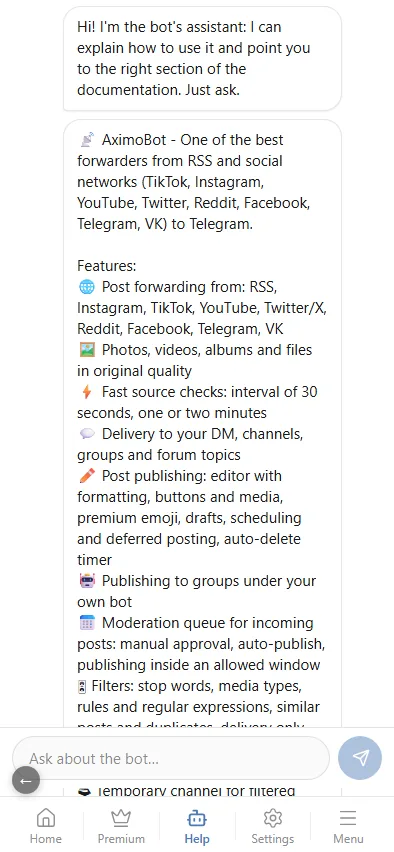
The Help tab of the mini app — a chat with an assistant that answers from the documentation and takes you to the right screen.
The bottom bar of the mini app has a Help tab. It is a chat with an AI assistant: it knows the AximoBot documentation and answers questions about the bot — where a setting is, why something does not work, how to set it up. An answer comes with links to the documentation sections it is based on and, when it is about a screen of the mini app, with a button that opens that screen.
What to ask
Write in plain language, as you would to a colleague. The assistant answers questions like:
- "How do I strip links and hashtags from posts?"
- "Why are Instagram posts not arriving?"
- "How do I defer publishing and moderate posts before they go out?"
- "What does Expert have over Pro?"
- "How do I connect my own bot so posts come under its name?"
How an answer is built
- The assistant looks the answer up in the documentation and answers from it — it does not invent settings that do not exist.
- Under the answer are the sources: the documentation sections it relied on. A link opens the section right inside the mini app.
- Open section appears when the answer is about a specific screen: the button takes you there. If the screen belongs to a chat, the assistant asks you to pick the chat first.
- When the documentation has no answer, the assistant says so and offers the documentation and Getting started.
The assistant does not see your settings or posts — it answers from the documentation. To investigate a specific delivery, open the events log and the source's sent messages.
Too many questions in a row and the assistant asks you to wait a few seconds.
A human
The assistant answers from the documentation only. When you need a person — to look into a specific case or report a bug — the Help tab also leads to the support group @madbots_talk.