 Aximo
Aximo en
en Русский
What AximoBot does
What AximoBot does before you add a source: 15+ platforms, delivery to a private chat, channel, group or forum topic, and the pipeline in between.
AximoBot is a Telegram bot that watches sources you give it and delivers every new post to a Telegram chat of your choice. A source can be an Instagram profile, a TikTok account, a YouTube channel, an X account, a subreddit, a public Telegram channel, an RSS feed or any of the 15+ platforms the bot understands. A destination can be your private chat with the bot, a channel, a group or a forum topic.
Between the source and the destination every post goes through a pipeline you control: filters, text replacements, translation, AI processing, your own message template, a watermark, a delivery schedule or a moderation queue. Each of those is a section in the mini app and works either for one source or for the whole chat.
Besides posts from sources a chat can carry your own: you write them by hand in the mini app and send them at once, save them as a draft or put them in the schedule — see Your own posts.
How it works
- The bot checks your sources on a schedule. The interval depends on the plan, from every 8 hours on the free plan down to minutes on paid ones — see Fast check.
- New posts are downloaded, including photos, videos, albums, documents and audio, so they arrive as native Telegram media rather than links.
- The post passes the pipeline of the chat and of the source: filters, replacements, translation, AI prompts, the template, logo removal and the watermark. The order of the steps is in A post's path.
- The post is delivered immediately, inside an allowed time window, or into a moderation queue where you approve it first. In groups and channels the message can come from your own bot.
- Everything pending is in one place — the Schedule and queue section: a calendar and a list where source posts and your own wait their turn.
Where the controls are
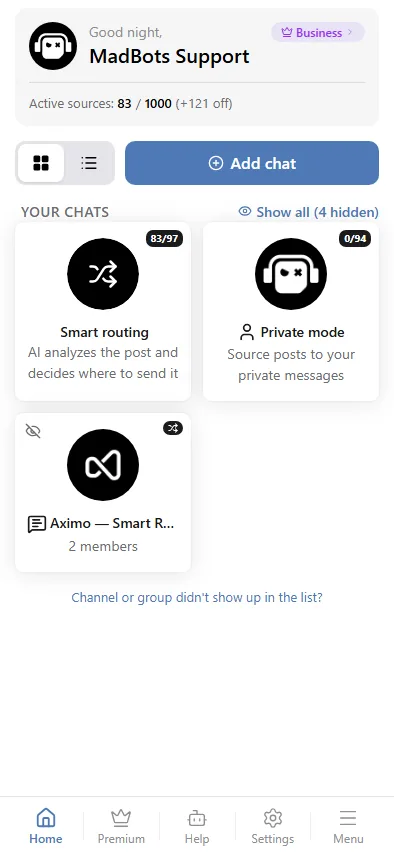
Everything is managed in the mini app: it opens from the bot's menu and is the control panel for chats, sources, settings, history and plans. It also works on a computer, in the browser, after a one-time sign-in with Telegram. This documentation shows the mini app throughout; see The mini app. The chat with the bot is where you paste a link to add a source, and where the posts arrive in private mode.
What you need
- A Telegram account. No registration outside Telegram.
- For channels and groups: administrator rights there — the mini app adds the bot as an administrator through Telegram's own picker.
- Nothing else. The limits depend on the plan — see Plans.
Where to go next
- Getting started — your first source in a minute.
- A post's path — what happens to a post on its way to the chat, and in which order.
- Working modes — private chat, channel, group, forum topic.
- Adding a source — which links work for each platform.
- Plans — limits and the subscription.
Questions that are not answered here go to the support group @madbots_talk. Updates are announced in @madbots.