 Aximo
Aximo en
en Русский
Your OpenRouter key
Plug in your own OpenRouter key — pick the models yourself and keep your plan's tokens untouched.
AI processing runs through AximoBot's shared account by default: we pick the model, and the tokens are charged against your plan's daily budget. With your own OpenRouter key you pay OpenRouter directly, choose the models yourself, and the plan budget is not touched.
Where to get a key
- Sign up at openrouter.ai and top up the balance.
- Under Keys create a key — it starts with
sk-or-v1-…. - Copy it: the full key is shown only once.
How to connect it
- Open the chat in the mini app → LLM settings.
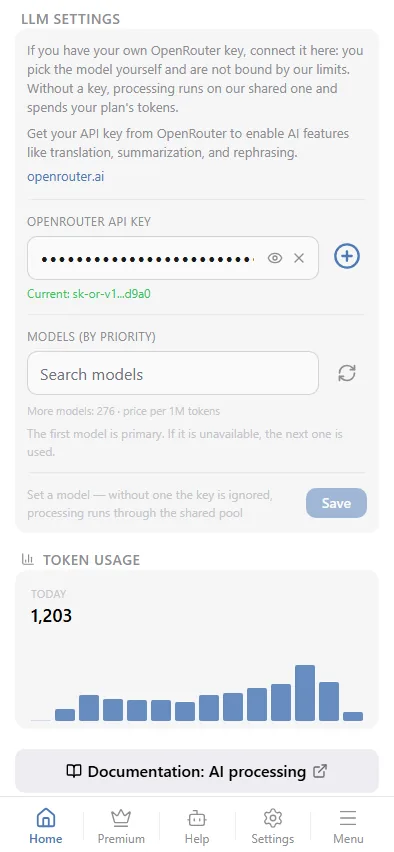
- Paste the key into OpenRouter API key and tap Save.
- Pick the models: the first one is primary, the next ones are fallbacks if it is unavailable. The list shows 270+ models with their price per million tokens and has a search box.
A key can be saved with no model picked — Save is not blocked; a grey hint just reminds you that without a model the key is ignored and processing runs through the shared pool. Your chosen model only takes effect together with your own key.
The key applies to the whole chat: every source of this chat with AI processing enabled uses your models.
If the key is rejected
When OpenRouter answers 401/403, the bot clears the key, falls back to the shared pool, logs an "OpenRouter key is invalid" entry in the events log and messages the chat owner. Create a new key and save it again.
Token usage at the bottom of the section shows the last 14 days by day and by model — with your own key it is just a reference, the plan limit does not apply.